
Gilchrist County VINE Coverage
Florida's service is VINE, short for Victim Information and Notification Everyday, and it is accessed through VINELink. Official Florida materials describe coverage for county jails and state prisons. An FDOC annual report states that all 67 county jails participate. Gilchrist County participation is therefore supported by the statewide program and by the Gilchrist County Sheriff's Office link to VINELink, but the live record should still identify the agency supplying each result.
VINE has two related functions. It can search a current or recently released person and display source-supplied custody information. It can also register delivery methods for future custody events. The service is not a full historical release archive. No fixed Florida retention window was found, so a person released long ago may no longer be searchable.
| Custody system | VINELink role | Final confirmation |
|---|---|---|
| Gilchrist County Jail | Search a current or recently released person when GCSO data is retained | GCSO released booking card or requested release record |
| Florida state prison | Search source-supplied status and register enabled alerts | FDOC population or release record |
| Federal prison | Not covered as a BOP locator | BOP Inmate Locator and federal records |
| Immigration custody | Not a substitute for the ICE locator | ICE Online Detainee Locator and transferring record |
A county booking that disappears from a live roster is not automatically a community release. It could reflect a transfer, spelling problem, data delay, or a web-retention limit. VINELink adds a useful status channel, but the custodian's record controls the event.
Search Gilchrist VINELink Records
Use the Florida VINE person search for one specific person. A name or offered identifier can lead to the record. Identity checks matter because different people can share a name, and an alternate spelling can hide the right match.
- Open the Florida person-search route. Confirm that Florida is the selected state before entering any details.
- Search the full first and last name or use the offered identifier. Try a documented alternate name when the first search fails.
- Compare the record's ID, reporting agency or facility, and other shown identity details. Do not rely on the name alone.
- Open the matching record. Read the exact custody status, custody detail, location, and status date rather than guessing from the result list.
- If the result says Released, note which agency supplied it and the status date. Then verify the event with that agency.
- If no record appears, try the GCSO release portal for a county booking or the matching FDOC search for a state prisoner. A no-hit is inconclusive.
The Florida VINELink search interface provides the name and identifier route used to reach a person's status and notification controls.
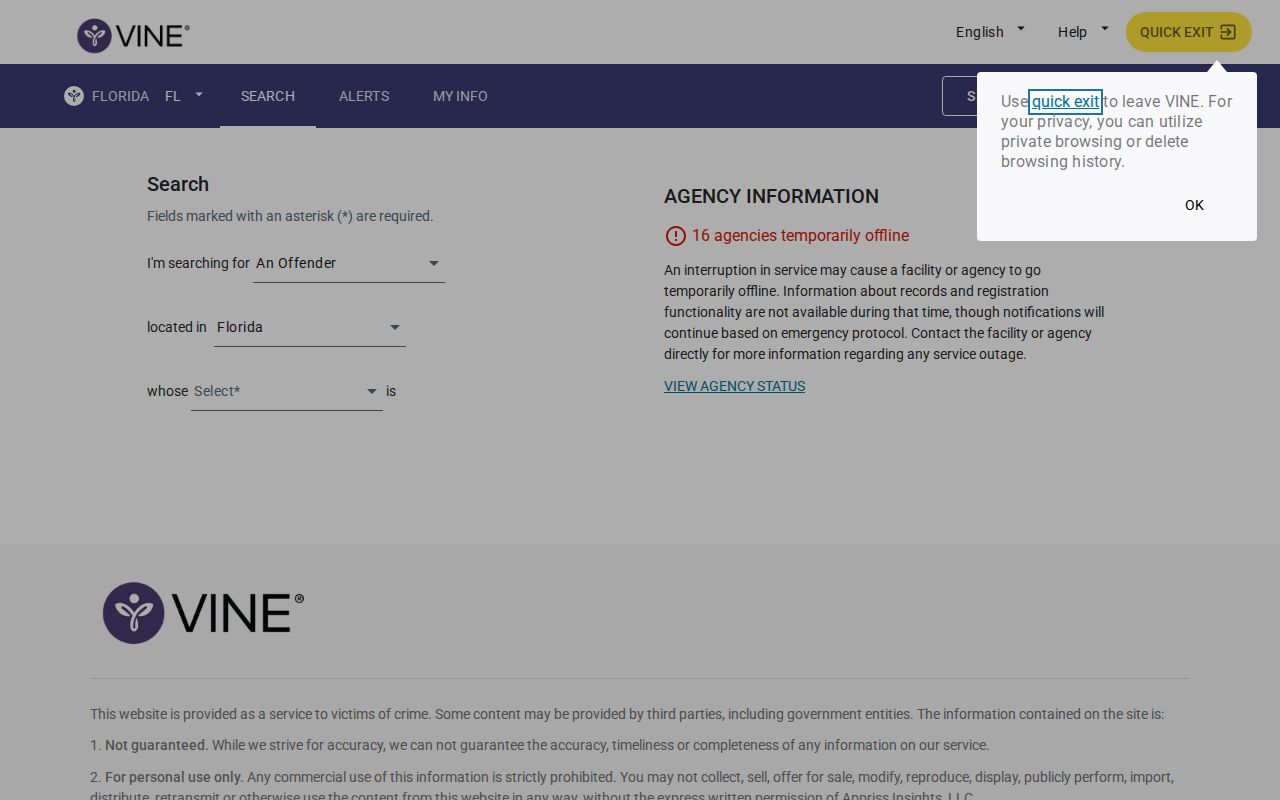
After opening a match, compare the reporting agency and record details before registering. That check keeps an alert tied to the intended person.
Note: A photograph or name match can support identity checking, but neither one alone proves current custody or release.
Gilchrist VINELink Release Fields
The field set depends on what the reporting source sends. Where a released record remains available, it may display Released with a custody-status date and detail. Read labels literally. A transfer, escape, out-to-court event, or death alert is not the same as a community release.
| Field | What it can show |
|---|---|
| Name or identifier | The identity attached to the source record; compare it with known information |
| Reporting agency | The jail or corrections source responsible for the status |
| Facility or location | The supplied custody location, which can change before the portal updates |
| Custody status | The source label, such as in custody or released, when retained |
| Status date or detail | The date or descriptive text tied to the reported custody change |
| Notification control | The option to add an alert method for that specific record |
The VINE status is not a legal release certificate. For Gilchrist County Jail, SmartWEB can show GCSO's exact released timestamp on a past booking, while the requested closing record can explain whether the event was bond, time served, court order, or transfer. For a state prisoner, FDOC's release information and incarceration history are the stronger release records.
How recent is “recently released”? VINE uses that general scope, but no Florida-specific public retention period was located. Use the custodian's archive or a records request for an older event.
Register Gilchrist Release Alerts
Registration starts from the correct person's record, not from a broad county list. The offered methods can include phone, text, email, or an in-app choice. Availability can vary by record and event. Use more than one method when the interface recommends it, and keep the registration details in a secure place.
- Open the verified person record and select its Add or notification control.
- Choose an offered contact method. Enter the phone number, text number, email address, or in-app information requested.
- For a phone alert, choose and re-enter a four-digit PIN. This PIN belongs to the notification registration.
- Complete the registration and retain the PIN. It may be needed to acknowledge calls or change the alert later.
- When a phone call arrives, listen to the event and enter the four-digit PIN followed by the pound sign. Calls can repeat until acknowledged or the retry cycle ends.
- Read each alert's named event. Then contact the reporting custodian when release or destination must be confirmed.
Text and email alerts generally do not repeat in the same way as calls. A missed text is not proof that no event occurred. Contact information can also fail or change. Keep the direct agency route available for a time-sensitive custody question.
Important: A VINE call may concern release, transfer, escape, death, out-to-court status, or another enabled event. Listen before drawing a conclusion.
Gilchrist VINE Agency Link
The Gilchrist County Sheriff's Office places VINELink in its own official site footer as the victim-information channel. That local link matters because it routes readers to Florida's statewide service without creating a separate county-branded VINE system. Search Florida, then verify that GCSO or the expected state facility is named on the record.
The GCSO official site and the Florida VINE entry page form the county-to-state route. There is no separate Gilchrist VINE portal. A page or message that looks county-specific but does not resolve to the official state service should not be treated as the reporting source.
Florida's VINE line is 1-877-846-3435 and operates around the clock. The number supports the notification service. It is not the records custodian for a GCSO booking or an FDOC time computation.
Note: Gilchrist's official link supports the VINE channel, while the named agency on the live record identifies who supplied the status.
Gilchrist FDOC Notification Records
The FDOC Victim Notification Request is separate from general-public VINELink self-registration. FDOC states that family members and friends who are not victims should use VINE instead of its victim form. Updating one route does not necessarily update the other.
The FDOC form serves the agency's own victim-notification process. VINELink registration is tied to the person record and the contact methods entered in the portal. Keep the channels distinct so a changed number, email address, or PIN is updated in the right place. Do not send the victim form merely to correct a general VINE alert.
State-prison release dates can change. The FDOC public detail and Bureau of Admission and Release remain the source for a sentence release, even when VINE sends the prompt. For a county booking, GCSO holds the release record. The Gilchrist County released inmate record paths show which custodian covers each population.
A transfer can trigger an alert while confinement continues. If the source changes from GCSO to FDOC, use the FDOC current-population search until the state itself reports release. If the alert names an out-to-court event, check the court and source facility rather than assuming that the person entered the community. The event label and reporting agency point to the next check.
Registrations are record-specific. A new booking, new agency record, or later custody episode may not inherit the old alert. Search again when official information shows that custody moved to a new system, then verify the new record before adding another notification method.
Confirm Gilchrist Release Alerts
Data can lag the physical event. It can also remain visible after another transfer or disappear after the source retention window. For a Gilchrist County Jail event, check the official SmartWEB released search and call the jail at (352) 463-3490 when timing or destination is urgent. A requested GCSO release record can supply the maintained closing code and receiving agency.
For a state prisoner, use the FDOC Inmate Population Information Search while the person may still be confined and the Inmate Release Information Search for a completed or scheduled release. FDOC's Bureau of Admission and Release handles release questions at (850) 488-9167 or dc.release@fdc.myflorida.com. If state community supervision follows, the Supervised Population Information Search answers that next stage.
Federal custody requires the BOP Inmate Locator, not VINELink. A federal result stating that a person is no longer in BOP custody does not rule out another sovereign's custody, supervision, or immigration detention. When GCSO records a federal or ICE transfer, follow the receiving system rather than treating the county release event as a return to the community.
For a historic Gilchrist event, use the GCSO public-records channel for a date-bounded request when neither VINE nor SmartWEB returns the expected result. Include the person's identifiers, booking number when known, and an approximate range. Ask for the maintained release time, closing code, code description, and receiving agency. This creates a focused path when a notification record has aged out.
Use a consistent three-part check: read the VINE event, identify the reporting agency, and confirm with that agency's record. That sequence preserves the value of a fast alert without asking a notification service to do the work of a legal custody record.